SPXMoves Indicators for ThinkorSwim
Professional SPX Expected Move Visualization for ThinkorSwim
$19.99
What You Get
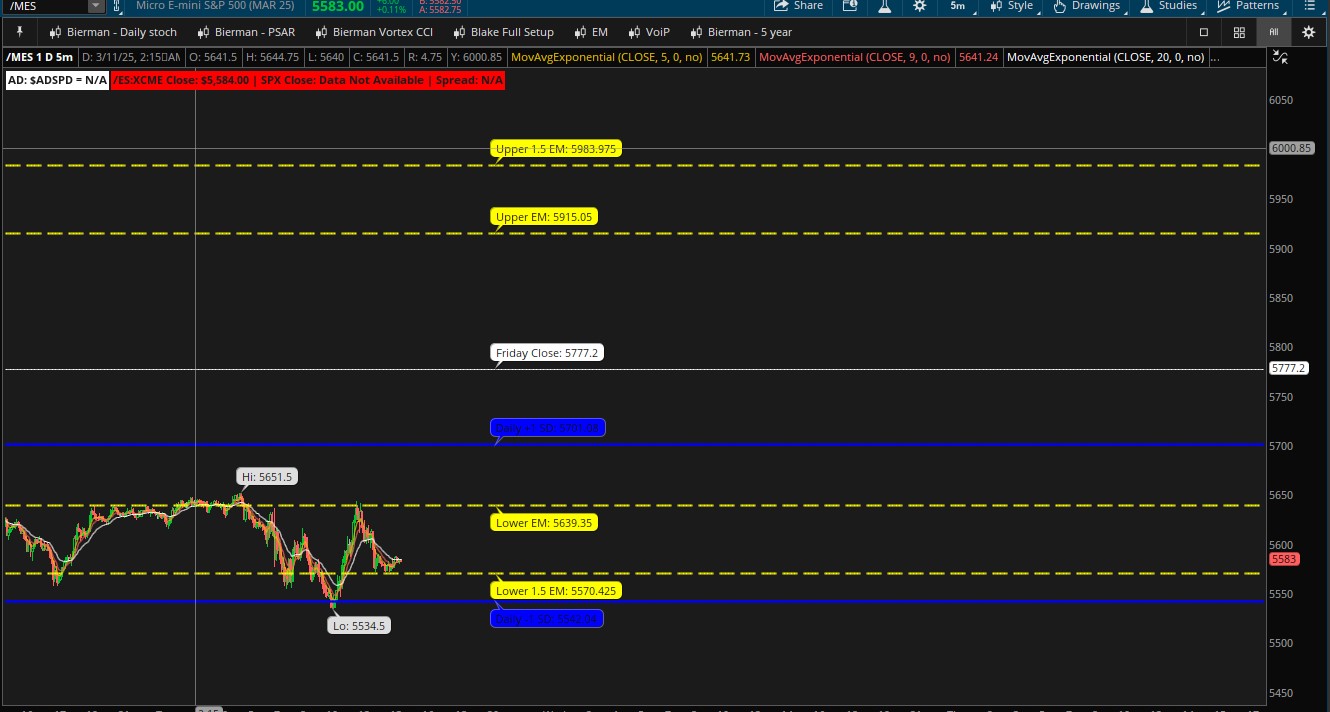
The SPXMoves indicator brings precision S&P 500 expected move tracking to your ThinkorSwim platform. This custom-built study provides clear visualization of both weekly and daily expected move boundaries directly on your charts, helping you make more informed trading decisions.
This package includes BOTH indicators:
- ES Futures Indicator - Designed for ES futures charts
- SPX/SPY Auto-Adjusting Indicator - Automatically plots SPX levels on SPX charts and equivalent SPY levels on SPY charts
Key Features
- Dual Timeframe Analysis: Simultaneously view weekly and daily expected move levels
- Easy-to-Update Parameters: Quickly adjust Friday close, daily close, and expected move values
- Multiple Deviation Levels: Track both 1.0 and 1.5 standard deviation boundaries
- Color-Coded Visualization: Distinct colors for weekly (yellow) and daily (blue) levels
- Clear Price Labels: All key levels display exact price values on your chart
- Futures-to-Cash Adjustment: Built-in spread adjustment capability
Perfect For
- Options traders tracking weekly and daily expected move ranges
- SPX day traders requiring precise support/resistance levels
- Swing traders analyzing probable price movement ranges
- Index futures traders needing clear market context
How It Works
Simply input your reference values (Friday SPX close, daily SPX close, expected move calculations, and any desired spread adjustment). The indicator instantly calculates and displays all relevant levels with clear, easy-to-read labels directly on your chart.
Installation
- Purchase this indicator package to receive installation links via email
- Quick Install Method:
- Click the tos.mx link from your email
- Click "View in ThinkorSwim"
- Click "Import"
- Apply to your chart
- Alternative Method:
- In ThinkorSwim, click SETUP (upper right)
- Click Open Shared Item
- Paste the indicator URL from your email
- Click Preview → Import
- Add to your chart
- Right-click the study → Edit Study to update values from SPXmoves.com
Note: This indicator is for use with TD Ameritrade's ThinkorSwim platform. Get your SPX values from spxmoves.com